Buat Pembayaran
Membuat transaksi baru, lalu mengarahkan pelanggan ke link pembayaran Aulaa.
/v1/paymentsMembuat transaksi pembayaran baru. order_id bersifat unik per project: mengirim ulang order_id yang sama ditolak dengan 409 Conflict — bukan membuat transaksi kedua — sehingga pelanggan tidak mungkin tertagih dua kali.
Request body
| Parameter | Tipe | Wajib | Deskripsi |
|---|---|---|---|
order_id |
string | Ya | ID order unik dari sistem Anda (mis. INV-20260627-001). Dipakai untuk idempotensi. |
amount |
integer | Ya | Nominal tagihan dalam Rupiah penuh. Batas: Rp1.000–Rp500.000.000. |
payment_method |
string | Tidak | Kode metode (mis. qris, bca_va) untuk mengunci metode. Boleh dikosongkan agar pelanggan memilih sendiri di halaman /pay/{ID}. |
redirect_url |
string | Tidak | URL website Anda tempat pelanggan dialihkan setelah pembayaran lunas. |
Contoh request
curl -X POST https://api.aulaa.co/v1/payments \
  -H "Authorization: Bearer pgw_id_xxxxxxxxxxxxxxxx" \
  -H "Content-Type: application/json" \
  -d '{
    "order_id": "INV-20260627-001",
    "amount": 50000,
    "payment_method": "qris"
  }'
const response = await fetch('https://api.aulaa.co/v1/payments', {
  method: 'POST',
  headers: {
    'Authorization': 'Bearer pgw_id_xxxxxxxxxxxxxxxx',
    'Content-Type': 'application/json',
  },
  body: JSON.stringify({
    order_id: 'INV-20260627-001',
    amount: 50000,
    payment_method: 'qris',
  }),
});

const invoice = await response.json();
console.log(invoice.payment_link);
// arahkan pelanggan ke link ini
import requests

response = requests.post(
    'https://api.aulaa.co/v1/payments',
    headers={
        'Authorization': 'Bearer pgw_id_xxxxxxxxxxxxxxxx',
        'Content-Type': 'application/json',
    },
    json={
        'order_id': 'INV-20260627-001',
        'amount': 50000,
        'payment_method': 'qris',
    }
)

invoice = response.json()
print(invoice['payment_link'])
<?php

$ch = curl_init('https://api.aulaa.co/v1/payments');

$payload = json_encode([
    'order_id' => 'INV-20260627-001',
    'amount' => 50000,
    'payment_method' => 'qris',
]);

curl_setopt_array($ch, [
    CURLOPT_POST => true,
    CURLOPT_POSTFIELDS => $payload,
    CURLOPT_HTTPHEADER => [
        'Authorization: Bearer pgw_id_xxxxxxxxxxxxxxxx',
        'Content-Type: application/json',
    ],
    CURLOPT_RETURNTRANSFER => true,
]);

$response = curl_exec($ch);
$invoice = json_decode($response, true);

echo $invoice['payment_link'];
package main

import (
    "bytes"
    "encoding/json"
    "fmt"
    "io"
    "net/http"
)

func main() {
    payload := map[string]interface{}{
        "order_id":       "INV-20260627-001",
        "amount":         50000,
        "payment_method": "qris",
    }

    body, _ := json.Marshal(payload)
    req, _ := http.NewRequest("POST",
        "https://api.aulaa.co/v1/payments",
        bytes.NewBuffer(body))

    req.Header.Set("Authorization", "Bearer pgw_id_xxxxxxxxxxxxxxxx")
    req.Header.Set("Content-Type", "application/json")

    resp, _ := http.DefaultClient.Do(req)
    defer resp.Body.Close()

    respBody, _ := io.ReadAll(resp.Body)

    var invoice map[string]interface{}
    json.Unmarshal(respBody, &invoice)
    fmt.Println(invoice["payment_link"])
}
Contoh response
Isi payment_method dan fee_amount bergantung pada metode yang Anda kirim. payment_link selalu berupa link halaman pembayaran Aulaa, apa pun metodenya. Pilih tab sesuai metodenya:
{
  "id": "f47ac10b-58cc-4372-a567-0e02b2c3d479",
  "order_id": "INV-20260627-001",
  "status": "pending",
  "amount": 50000,
  "fee_amount": 0,
  "charged_amount": 50000,
  "currency": "IDR",
  "country_code": "ID",
  "payment_method": null,
  "payment_link": "https://payment.aulaa.co/pay/f47ac10b-58cc-4372-a567-0e02b2c3d479",
  "redirect_url": "https://toko-anda.com/checkout/sukses",
  "is_test": false,
  "expired_at": "2026-06-27T08:00:00Z",
  "paid_at": null,
  "created_at": "2026-06-27T07:00:00Z"
}
{
  "id": "f47ac10b-58cc-4372-a567-0e02b2c3d479",
  "order_id": "INV-20260627-001",
  "status": "pending",
  "amount": 50000,
  "fee_amount": 7000,
  "charged_amount": 50000,
  "currency": "IDR",
  "country_code": "ID",
  "payment_method": "credit_card",
  "payment_link": "https://payment.aulaa.co/pay/f47ac10b-58cc-4372-a567-0e02b2c3d479",
  "redirect_url": "https://toko-anda.com/checkout/sukses",
  "is_test": false,
  "expired_at": "2026-06-27T08:00:00Z",
  "paid_at": null,
  "created_at": "2026-06-27T07:00:00Z"
}
{
  "id": "f47ac10b-58cc-4372-a567-0e02b2c3d479",
  "order_id": "INV-20260627-001",
  "status": "pending",
  "amount": 50000,
  "fee_amount": 350,
  "charged_amount": 50000,
  "currency": "IDR",
  "country_code": "ID",
  "payment_method": "qris",
  "payment_link": "https://payment.aulaa.co/pay/f47ac10b-58cc-4372-a567-0e02b2c3d479",
  "redirect_url": "https://toko-anda.com/checkout/sukses",
  "is_test": false,
  "expired_at": "2026-06-27T08:00:00Z",
  "paid_at": null,
  "created_at": "2026-06-27T07:00:00Z"
}
{
  "id": "f47ac10b-58cc-4372-a567-0e02b2c3d479",
  "order_id": "INV-20260627-001",
  "status": "pending",
  "amount": 50000,
  "fee_amount": 7500,
  "charged_amount": 50000,
  "currency": "IDR",
  "country_code": "ID",
  "payment_method": "bca_va",
  "payment_link": "https://payment.aulaa.co/pay/f47ac10b-58cc-4372-a567-0e02b2c3d479",
  "redirect_url": "https://toko-anda.com/checkout/sukses",
  "is_test": false,
  "expired_at": "2026-06-27T08:00:00Z",
  "paid_at": null,
  "created_at": "2026-06-27T07:00:00Z"
}
{
  "id": "f47ac10b-58cc-4372-a567-0e02b2c3d479",
  "order_id": "INV-20260627-001",
  "status": "pending",
  "amount": 50000,
  "fee_amount": 3500,
  "charged_amount": 50000,
  "currency": "IDR",
  "country_code": "ID",
  "payment_method": "shopee_pay",
  "payment_link": "https://payment.aulaa.co/pay/f47ac10b-58cc-4372-a567-0e02b2c3d479",
  "redirect_url": "https://toko-anda.com/checkout/sukses",
  "is_test": false,
  "expired_at": "2026-06-27T08:00:00Z",
  "paid_at": null,
  "created_at": "2026-06-27T07:00:00Z"
}
{
  "id": "f47ac10b-58cc-4372-a567-0e02b2c3d479",
  "order_id": "INV-20260627-001",
  "status": "pending",
  "amount": 50000,
  "fee_amount": 5000,
  "charged_amount": 50000,
  "currency": "IDR",
  "country_code": "ID",
  "payment_method": "alfamart",
  "payment_link": "https://payment.aulaa.co/pay/f47ac10b-58cc-4372-a567-0e02b2c3d479",
  "redirect_url": "https://toko-anda.com/checkout/sukses",
  "is_test": false,
  "expired_at": "2026-06-27T08:00:00Z",
  "paid_at": null,
  "created_at": "2026-06-27T07:00:00Z"
}
Bentuk response untuk bank VA, e-wallet, dan gerai retail lain sama dengan contoh di tabnya. Yang berbeda hanya payment_method dan fee_amount. Daftar kode lengkapnya ada di Metode Pembayaran.
id= ID invoice Aulaa ·payment_link= link halaman pembayaran untuk pelanggan ·amount= nominal order ·fee_amount= biaya layanan Aulaa ·charged_amount= total yang dibayar pelanggan ·status= status awal (pending).
Menyajikan pembayaran ke pelanggan
Arahkan pelanggan ke payment_link dari response: lewat redirect, tab baru, webview di aplikasi, atau kirim linknya lewat WhatsApp/email. Halaman pembayaran Aulaa yang menampilkan nomor VA, kode QR, tombol e-wallet, atau kode bayar ritel beserta cara membayarnya, jadi Anda tidak perlu membuat halaman pembayaran sendiri.
const invoice = await response.json(); // response POST /v1/payments dari backend Anda
window.location.href = invoice.payment_link;
const invoice = await response.json();
res.redirect(303, invoice.payment_link);
$invoice = json_decode($response, true);
header('Location: ' . $invoice['payment_link'], true, 303);
exit;
Setelah membayar, pelanggan otomatis dialihkan ke redirect_url Anda (bila diisi), lalu webhook dikirim ke project Anda.
Tampilan halaman pembayaran
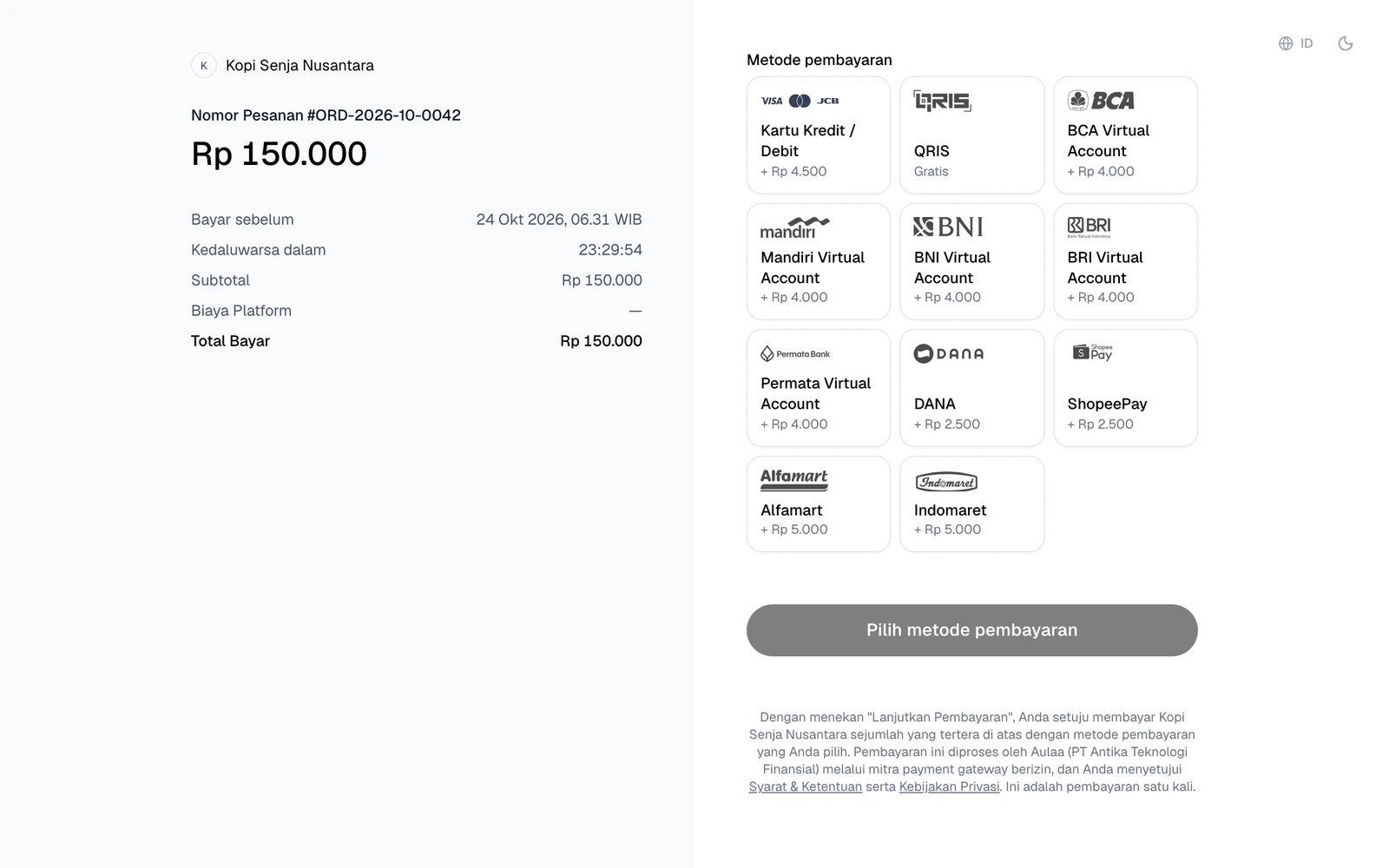
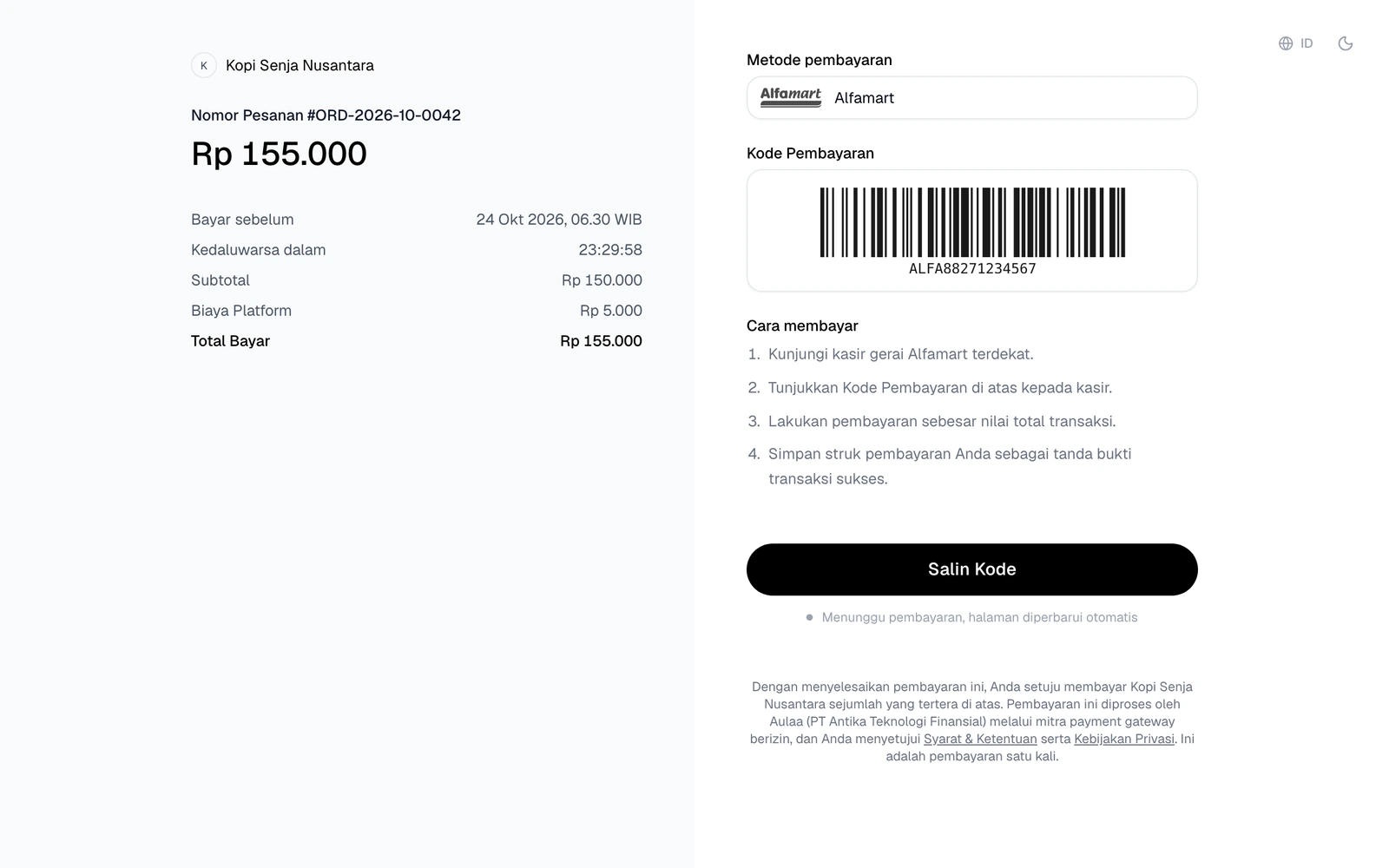
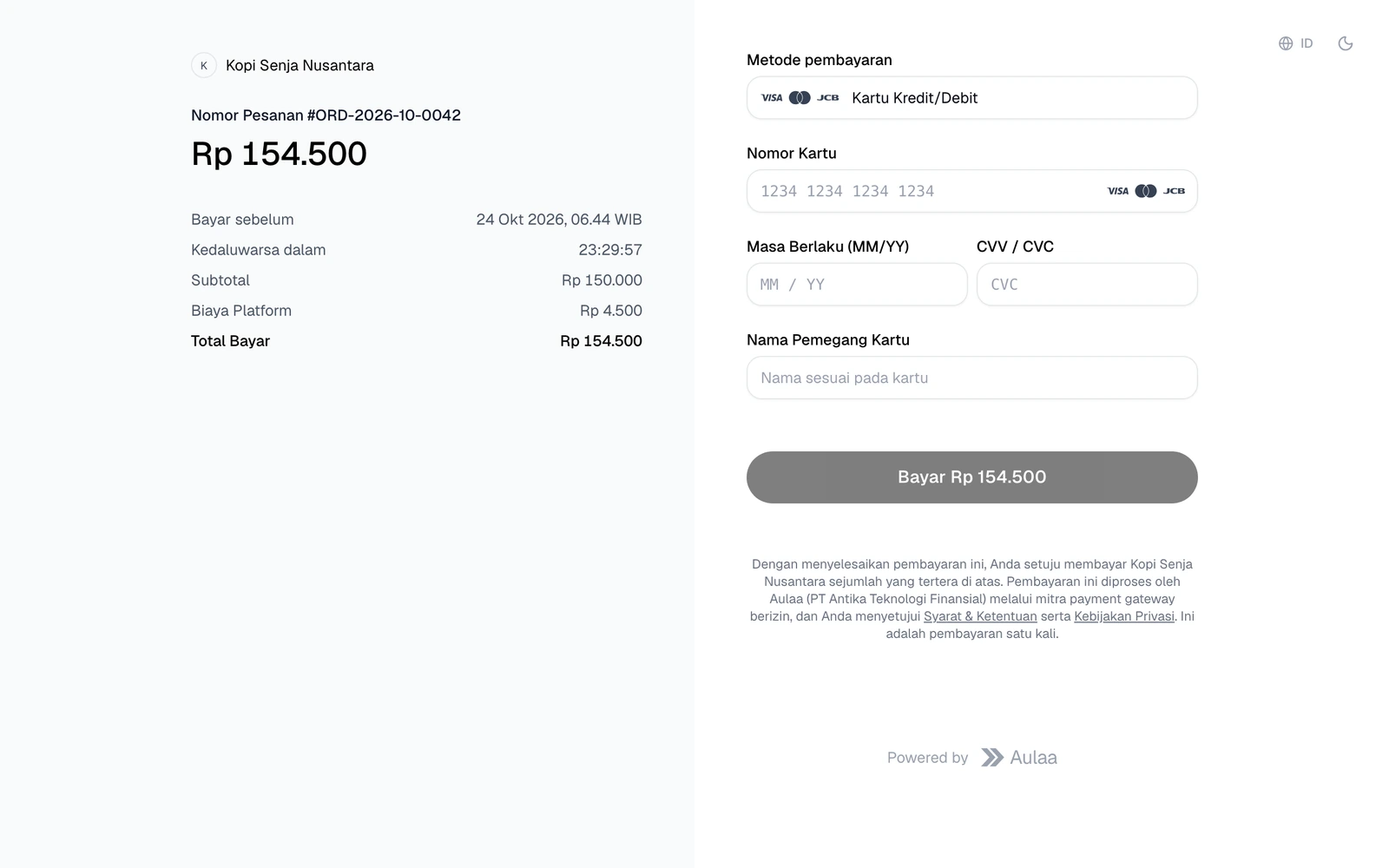
Isi halaman menyesuaikan metodenya. Ringkasan tagihan ada di kiri, petunjuk bayar di kanan. Di ponsel, keduanya tersusun atas-bawah.
Metode belum ditentukan
Bila payment_method dikosongkan, pelanggan memilih sendiri dari metode yang aktif di project Anda. fee_amount bernilai 0 sampai metode dipilih.
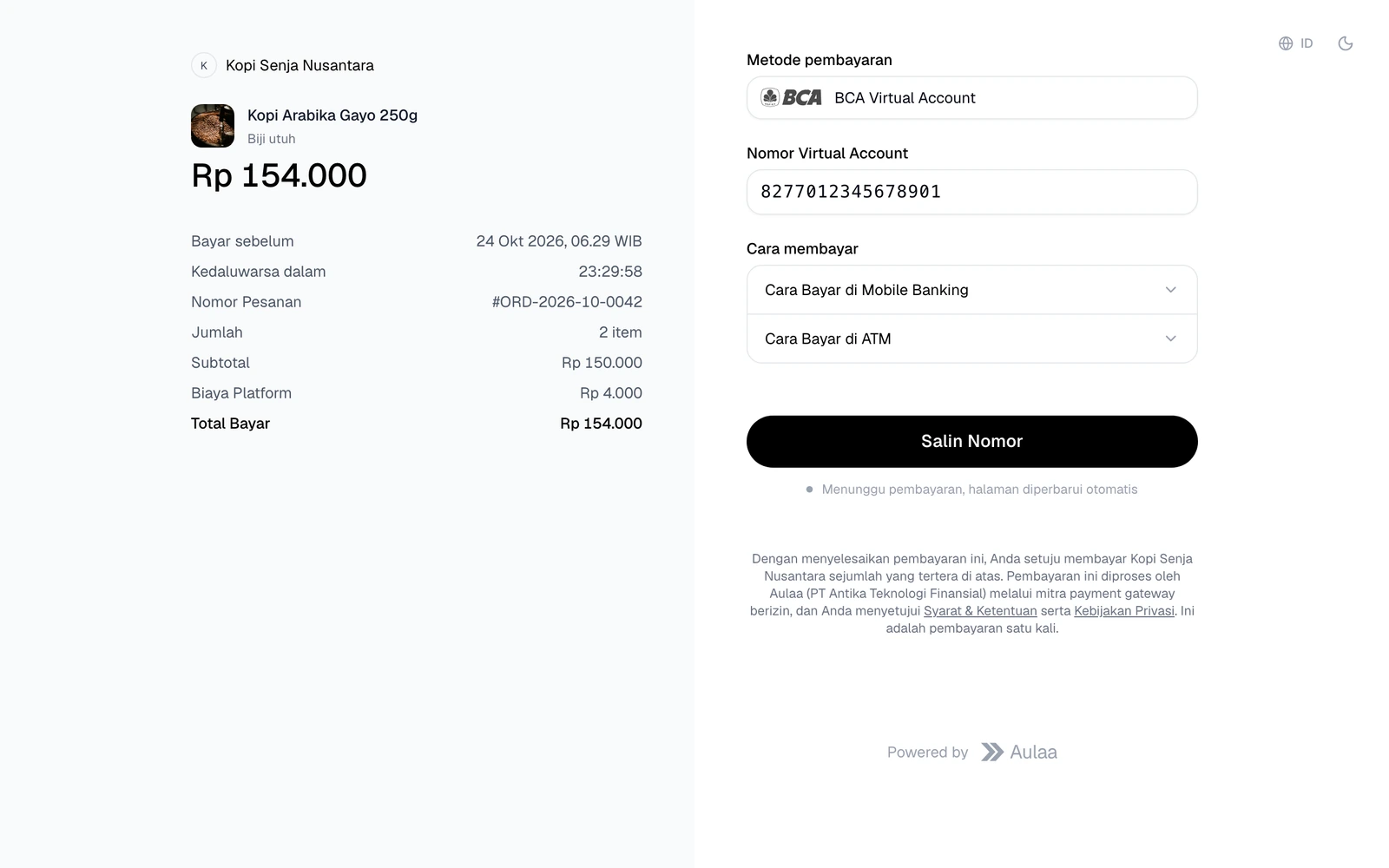
Virtual Account
Nomor VA ditampilkan dengan tombol Salin Nomor dan cara bayar lewat mobile banking maupun ATM.
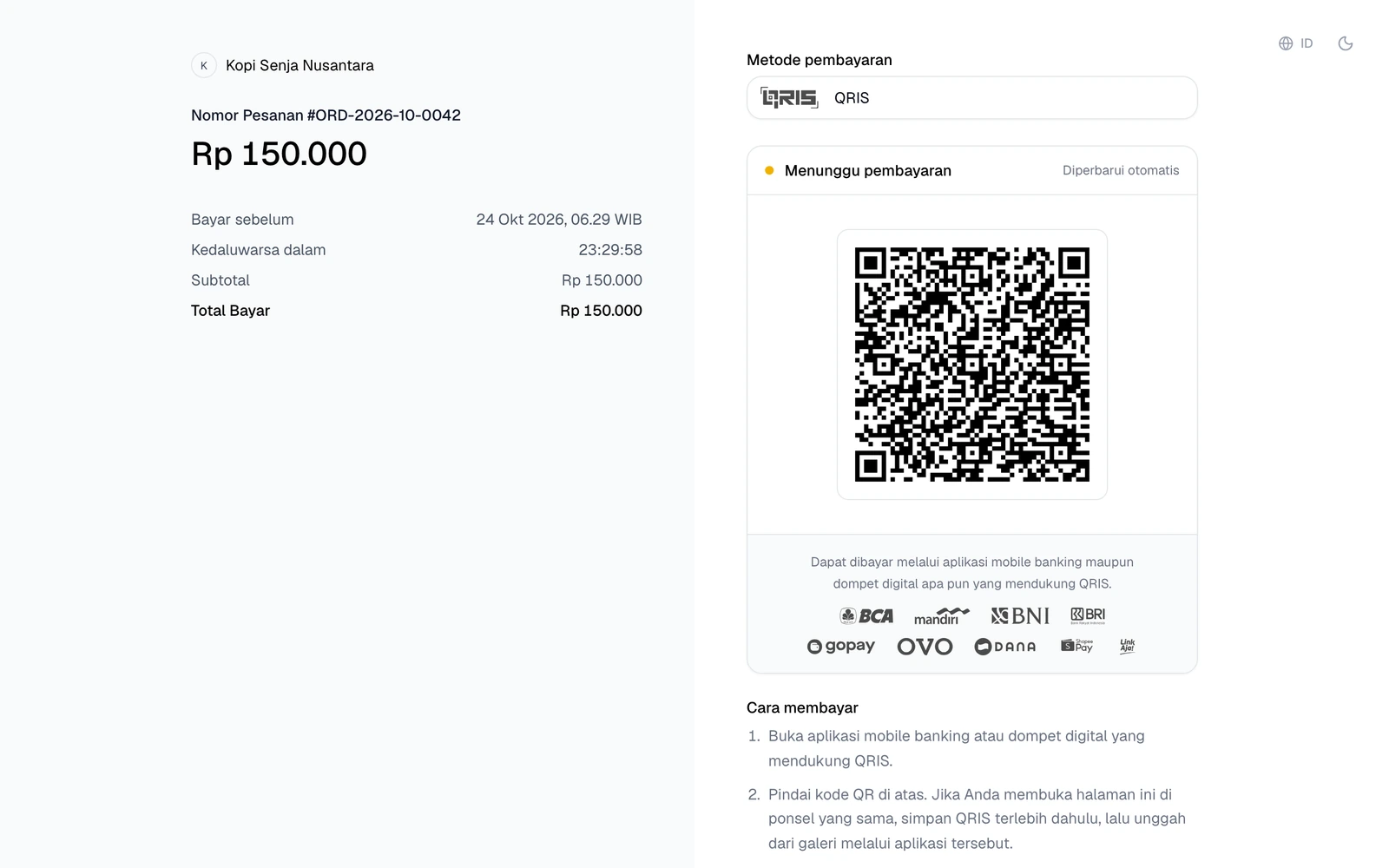
QRIS
Kode QR bisa dipindai dari aplikasi mobile banking atau dompet digital apa pun yang mendukung QRIS. Status di atas QR diperbarui otomatis begitu pembayaran masuk.
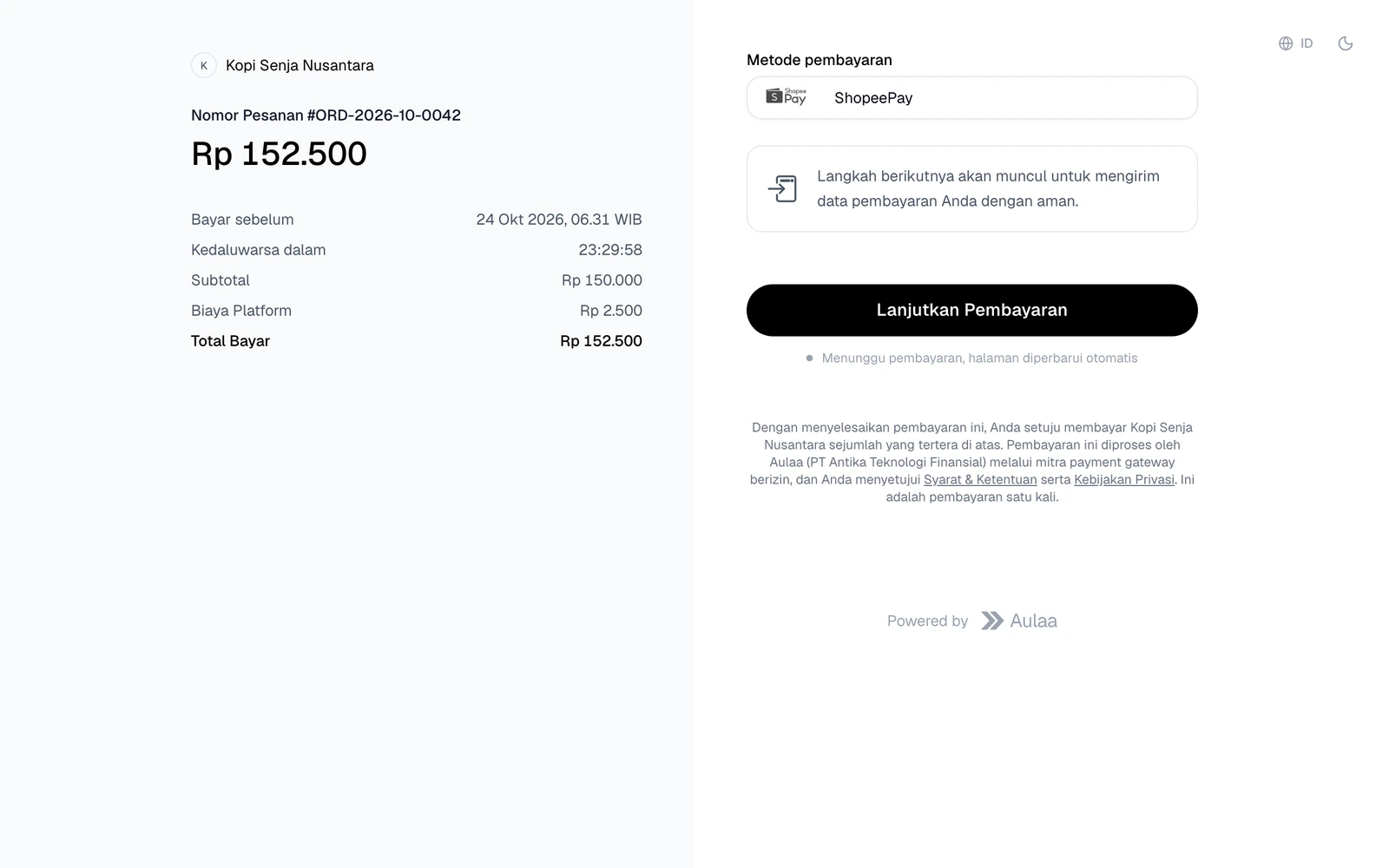
E-Wallet
Pelanggan menekan Lanjutkan Pembayaran untuk membuka aplikasi atau halaman e-wallet, lalu kembali ke halaman ini setelah membayar.
Alfamart / Indomaret
Kode bayar ditampilkan beserta barcode untuk ditunjukkan ke kasir.
Kartu Kredit/Debit
Pelanggan mengisi data kartu (Visa, Mastercard, JCB) di halaman yang sama. Kartunya diproses di lingkungan yang sesuai PCI DSS, jadi data kartu tidak pernah melewati server Anda.
Response 409 — order_id sudah pernah dipakai
{
  "error": "Pesanan dengan order_id INV-20260627-001 sudah pernah dibuat",
  "payment_id": "f47ac10b-58cc-4372-a567-0e02b2c3d479"
}
payment_id adalah id transaksi yang sudah dibuat sebelumnya dengan order_id tersebut. Response ini berguna bila request pertama Anda terputus sebelum response diterima, misalnya karena timeout. Kirim ulang request dengan order_id yang sama, ambil payment_id dari response 409, lalu cek statusnya lewat Cek Status.
Jangan membuat order_id baru untuk pesanan yang sama, karena pelanggan bisa mendapat tagihan ganda.
Terakhir diperbarui 23 Oktober 2026